Free Grammar Checker Online — Fix Grammar, Spelling and Passive Voice Instantly
Free online grammar and spell checker. Fix grammar errors, spelling mistakes, passive voice and weak words instantly. No signup, 100% browser-based.
What is an Online Grammar Checker?
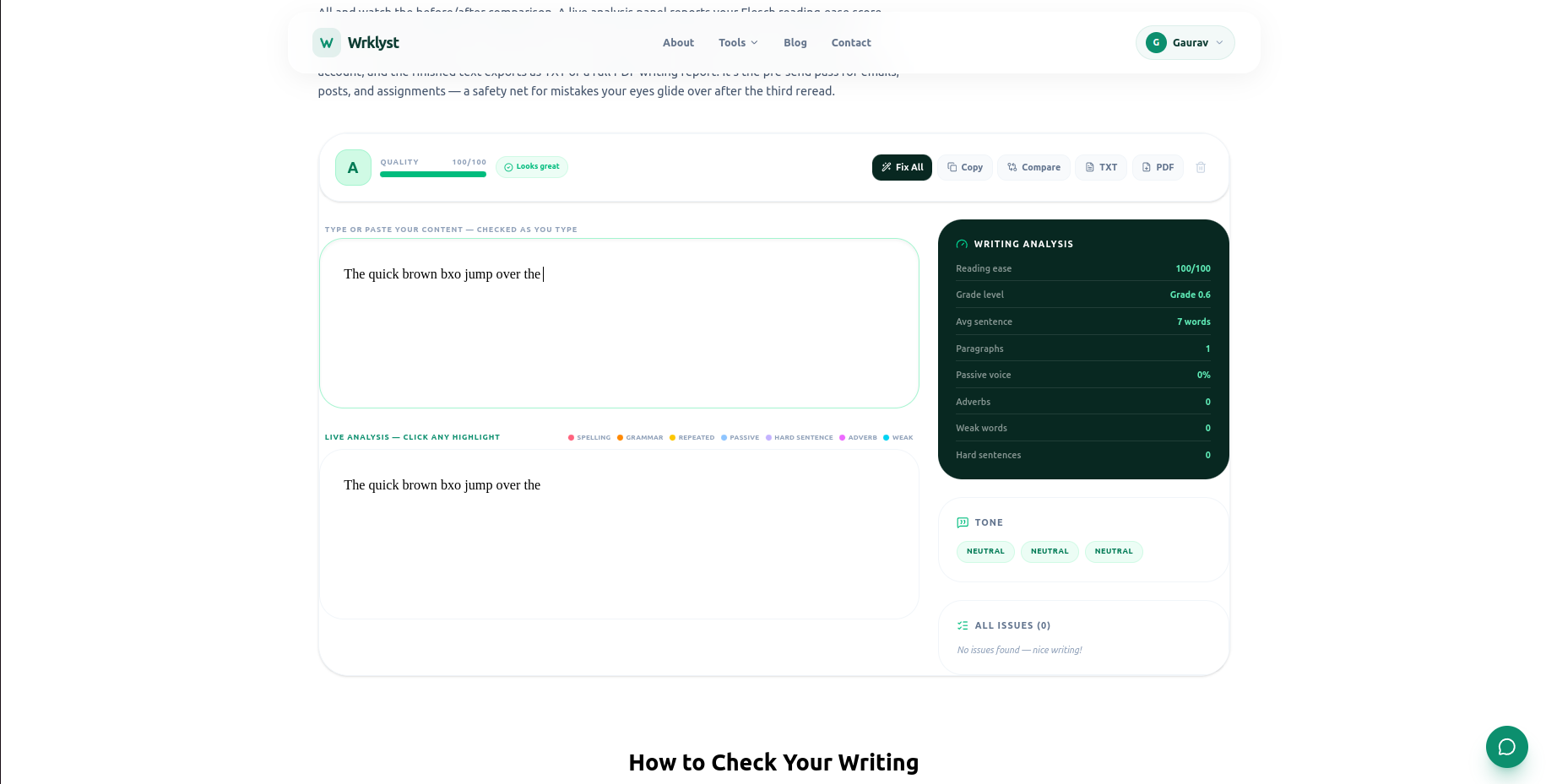
An online grammar checker scans your text for grammar errors, spelling mistakes, punctuation problems, and weak writing patterns — and suggests fixes instantly. Paste any text and get a detailed breakdown of what to improve before publishing, submitting, or sending.
What Wrklyst Grammar Checker Detects
Grammar and Spelling
- Spelling mistakes — highlighted in red
- Grammar errors — highlighted in orange
- Repeated words — highlighted in yellow
- Punctuation errors — missing commas, apostrophes, periods
- Subject-verb agreement — catches common agreement errors
Writing Style Analysis
- Passive voice sentences — highlighted in blue
- Very long sentences — sentences over 20 words flagged
- Weak words — very, really, just, quite, basically
- Adverb overuse — detects excessive adverb usage
- Redundant phrases — common wordy constructions
Readability Scores
- Flesch Reading Ease — 0 to 100 score
- Flesch-Kincaid Grade Level — US school grade equivalent
- Tone detector — formal, casual, confident, uncertain
- Overall writing grade — A to F rating
- Passive voice percentage — percentage of passive sentences
How to Check Grammar Online
- Open wrklyst.com/tools/grammar-checker
- Paste or type your text
- Errors highlight in real time as you type
- Click any highlighted error to see the suggestion
- Click fix to apply the correction
- Copy or export the corrected text
Everything runs in your browser. Your text never leaves your device — safe for confidential emails, private documents, and unpublished writing.
Grammar Checker vs Grammarly
Grammarly requires an account, installs a browser extension, and sends your text to their servers for processing. The free version is heavily limited — most useful suggestions are locked behind a $12/month subscription.
Wrklyst grammar checker requires no account, no extension, and no subscription. Open it, paste your text, and get results instantly. Your text never leaves your browser tab.
Why Passive Voice Weakens Writing
Passive voice removes the actor from the sentence, making writing feel vague and indirect.
Passive: "The report was submitted by the team on Friday."
Active: "The team submitted the report on Friday."
Active sentences are shorter, clearer, and more direct. Most style guides — academic, business, and journalistic — recommend keeping passive voice below 10% of sentences. The grammar checker shows your passive voice percentage so you can target this threshold.
Why Weak Words Hurt Your Writing
Words like "very", "really", "just", "quite", and "basically" add length without adding meaning. They are filler words that dilute the impact of your writing.
Weak: "This is a very important point that you really need to understand."
Strong: "This point is critical."
Removing weak words makes every sentence more direct and more confident. The grammar checker flags these automatically so you can decide which ones to cut.
Understanding Flesch Reading Ease Score
The Flesch Reading Ease score measures how easy your text is to read on a scale of 0 to 100. Higher is easier.
- 90-100 — Very easy, understood by 11-year-olds
- 70-80 — Easy, everyday conversational English
- 60-70 — Standard, understood by 13-15 year olds
- 50-60 — Fairly difficult, high school level
- 30-50 — Difficult, college level
- 0-30 — Very difficult, university graduate level
For general web content, aim for 60-70. For technical documentation, 40-60 is acceptable. For children or general audiences, target 70 or above.
Who Uses Grammar Checkers
- Students — proofread essays and assignments before submission
- Professional writers — catch errors before sending to editors
- Non-native English speakers — verify grammar before publishing
- Bloggers — improve readability scores for SEO
- Business professionals — polish emails and reports
- Job seekers — check cover letters and CVs for errors
- Social media managers — verify posts before publishing
Frequently Asked Questions
Is the grammar checker completely free?
Yes — no account, no subscription, no usage limit. Paste any length of text and get instant results with no features locked behind a paywall.
Does my text get stored anywhere?
No. The grammar checker runs entirely in your browser. Nothing you type or paste is sent to any server. Your text is processed locally and never leaves your device.
How accurate is the grammar checker?
The checker catches the majority of common grammar and spelling errors in English text. For complex grammatical nuances, a human proofreader remains the gold standard — but for everyday writing, the checker catches most problems before they reach your reader.
Can it check grammar in other languages?
The grammar checker is optimized for English. Spelling detection may work partially for other Latin-script languages, but grammar rules and style suggestions are English-specific.
What is the difference between grammar and spell check?
Spell check catches incorrectly spelled words. Grammar check catches correctly spelled words used incorrectly — their vs there, affect vs effect, or subject-verb disagreement. Both are needed for clean, professional writing.
Try It Free
Check grammar, spelling, and writing style instantly — free, private, no account required.
Last updated
July 28, 2026