JSON Formatter Online Free — Beautify, Validate & Minify JSON Instantly
Free online JSON formatter, validator and minifier. Beautify messy JSON, validate syntax errors, convert JSON to CSV, XML and YAML. No signup, 100% browser-based.
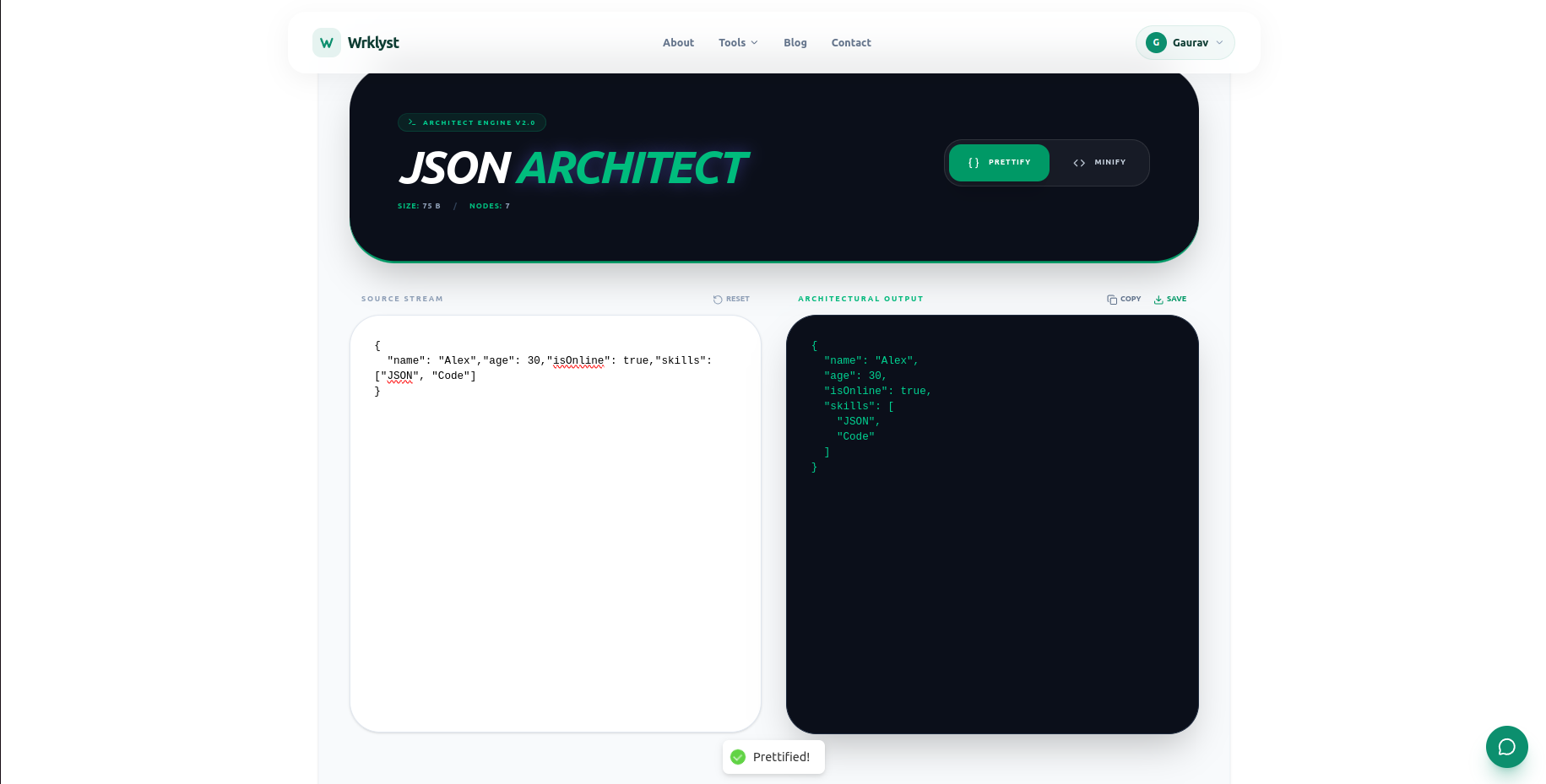
A JSON formatter takes raw, unreadable JSON and transforms it into clean, indented, human-readable output. Paste minified API responses, config files, or exported data — the formatter structures it instantly so you can read, debug, and edit it without eye strain.
What Wrklyst JSON Formatter Can Do
Core Formatting
- Beautify JSON — pretty print with 2 or 4 space indentation
- Minify JSON — compress by removing all whitespace
- Validate JSON — find exact error line and character position
- Sort keys — sort all keys alphabetically
- Toggle indentation — 2 spaces, 4 spaces, or tabs
View Modes
- Tree view — collapsible nodes for easy navigation
- Raw text view — standard editor view
- Side by side — input left, formatted output right
- Collapse/Expand all — control entire tree at once
JSON Analysis
- Total keys and values count
- Nesting depth level
- File size in bytes and KB
- Array and object count
- String, number, boolean and null counts
Conversion Tools
- JSON to CSV — export tabular data as spreadsheet
- JSON to XML — convert for legacy systems
- JSON to YAML — convert for config files
- CSV to JSON — import spreadsheet data
How to Format JSON Online
- Open wrklyst.com/tools/json-formatter
- Paste your JSON or upload a .json file
- Click Format or press Ctrl+Enter
- Copy output or download as .json file
Everything runs in your browser. Your JSON data never leaves your device — no server processing, no data storage, no privacy concerns.
How to Validate JSON
Invalid JSON is one of the most common developer frustrations. A missing comma, an extra bracket, or a trailing comma after the last element breaks the entire structure silently in some parsers and loudly in others.
Wrklyst JSON validator highlights the exact line and character where the error occurs — so instead of searching through hundreds of lines, you jump straight to the problem. Common JSON errors include:
- Missing or extra commas
- Unmatched brackets or braces
- Single quotes instead of double quotes
- Trailing commas after last items
- Unescaped special characters in strings
- Comments (not valid in JSON)
JSON Beautify vs JSON Minify
These are opposite operations with different use cases:
Beautify adds indentation and line breaks, making JSON readable for humans. Use it when debugging API responses, reviewing config files, or editing data manually.
Minify removes all whitespace, making JSON as compact as possible. Use it before sending JSON in HTTP requests, storing in databases, or embedding in production code where file size matters.
A 10KB beautified JSON file might compress to 6KB minified — meaningful savings at scale across thousands of API calls.
JSON to CSV Conversion
Converting JSON arrays to CSV is one of the most common data tasks developers and analysts face. Wrklyst handles flat JSON arrays automatically — paste your JSON array, click Convert, and download a properly formatted CSV ready for Excel, Google Sheets, or any data tool.
Developer Features
- Fetch from URL — paste any API endpoint and format the response directly
- JSON diff — compare two JSON objects and highlight differences
- Escape/Unescape — handle JSON strings with special characters
- JWT decoder — paste a JWT token and see the decoded header and payload
- Search within JSON — find any key or value instantly
Who Uses JSON Formatter
- Backend developers — debug API responses and validate request payloads
- Frontend developers — inspect fetch responses and format config files
- QA engineers — verify API output matches expected structure
- Data analysts — convert JSON exports to CSV for analysis
- DevOps engineers — format and validate JSON config files
- Students — learn JSON structure through visual tree view
Frequently Asked Questions
How do I format JSON online for free?
Paste your JSON into Wrklyst JSON formatter and click Format or press Ctrl+Enter. The tool instantly beautifies your JSON with proper indentation. No account needed, no file size limit, completely free.
How do I validate JSON?
Paste your JSON into the formatter. If it contains errors, the validator highlights the exact line and character position of the problem with a clear error message. Fix the error and reformat.
What is the difference between JSON beautify and minify?
Beautify adds indentation and line breaks for human readability. Minify removes all whitespace for compact file size. Use beautify for debugging and editing, use minify for production code and API requests.
How do I convert JSON to CSV?
Paste a JSON array into the converter, click JSON to CSV, and download the result. The tool maps JSON keys to CSV column headers automatically. Works best with flat arrays of objects.
Is my JSON data private?
Yes — all formatting, validation, and conversion runs entirely in your browser. Your JSON data is never sent to any server, never stored, and never leaves your device. Safe for API keys, config files, and sensitive data structures.
Try It Free
Format, validate, and convert JSON instantly — free, private, no account required.
Last updated
July 28, 2026